Compatibility
INFORMATION
The Jeedom team strives to keep this information up to date, sometimes at the expense of other developments. The community’s support is invaluable for all aspects of the documentation, and this page is a top priority.
Official boxes
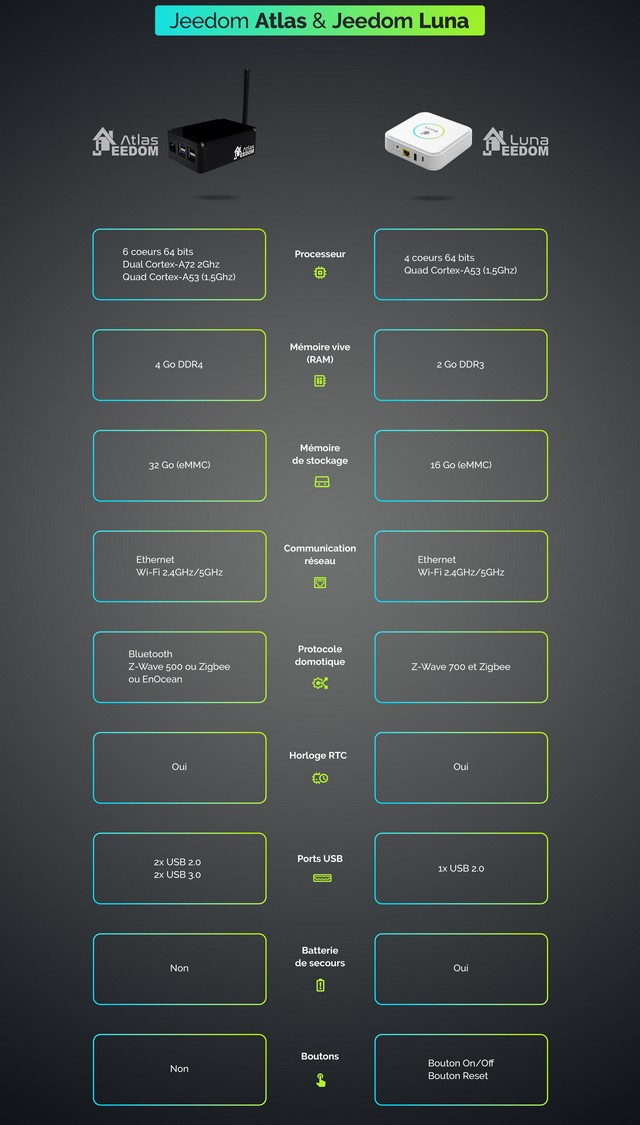
Jeedom and Domadoo develop and market official “turnkey” boxes, with Jeedom preinstalled on an optimized system that includes services, plugins, and enhanced technical support. The official boxes also feature an automatic system restore tool.
INFORMATION
Although it is no longer widely marketed, the Jeedom Smart box remains a perfectly viable official solution, and the system continues to be maintained by the team.
Hardware
Our recommendations will depend on various factors:
- Jeedom Atlas or Luna: the perfect blend of simplicity, optimization, and advanced compatibility.
- Nano-computer (Odroid C2, Rock Pi, Raspberry Pi, etc.): the best value for the price.
- Mini-PC (NUC): Extreme performance for a higher budget (see the dedicated advanced tutorial for more details).
Supported Devices
IMPORTANT
Official support is limited to the Jeedom instance. Only official boxes are also covered by system support (excluding modifications).
| Official Boxes | Nano-computers | Computers | Hypervisors |
|---|---|---|---|
| Smart, Atlas, Luna | Odroid C2, Rock Pi Series 4, Raspberry Pi 3/4 and similar | 64-bit systems, Mini-PCs (NUC), Intel® N100 processor | 64-bit systems, VirtualBox, VMware, Proxmox, Hyper-V, Freebox |
Unsupported devices
| Official Boxes | Nano-computers | Computers | Hypervisors |
|---|---|---|---|
| Jeedomboard, Mini+ | Hummingboard, Raspberry Pi 0/1/2 and similar | 32-bit systems | 32-bit systems |
Software-based
Debian
| Version | Status |
|---|---|
| Debian 11 Bullseye | Recommended |
| Debian 12 Bookworm | Supported (4.5) |
| Debian 13 Trixie | Pending validation |
| Debian 10 Buster and earlier | Not supported |
PHP
| Version | Status |
|---|---|
| PHP 7 | Recommended |
| PHP 8 | Supported (4.5) |
| PHP 5.6 | End of support (4.1) |
| PHP 5.5 and earlier | Not supported |
MySQL
| Version | Status |
|---|---|
| MySQL 7.4 | Recommended |
| MySQL 5.5/5.6/5.7 | Supported |
MariaDB
| Version | Status |
|---|---|
| MariaDB 10 | Recommended |
Official system images
The team develops custom system images for a wide variety of devices, including Debian, Jeedom, and all recommended software dependencies:
File verification
The SHA256 key, which is used to verify the integrity of the downloaded file, can be found in the file info.json located in the download folder.
First connection
View the documentation related to First login to access the Jeedom interface after installation.
System console
IMPORTANT
It is neither recommended nor necessary to make changes at the system console level to use Jeedom.
Any changes to the system may affect the proper functioning of Jeedom.
The default credentials for accessing the system console (keyboard/screen or SSH) are: jeedom/Mjeedom96. The password root is the same.
Compatible devices
Depending on the protocols and plugins used, it’s not always easy to know whether a module will be supported. To help you determine whether your hardware is compatible, you can visit the website Jeedom Compatibility whose list is kept up to date by the plugins themselves.
In addition, the information on this site can be cross-referenced with that available on the online store for home automation equipment Domadoo.
Below are a few examples of links to consult depending on the protocol in question:
Bluetooth
Cameras
EnOcean
RFXcom
Zigbee
Z-Wave
DIY Installation Example
For a DIY (Do It Yourself) setup, here is a “typical” configuration to get started with Jeedom and Z-Wave:
-
Raspberry Pi 4:
- A Raspberry Pi + case ~€50
- An Aeotec Gen 5 key ~ €60
- A microSD card ~ €7
- A USB power adapter ~ €8
That comes to a total of €125 for an open-source home automation hub that gives you complete control over its setup.
INFORMATION
You can add or replace devices with an RFxCom antenna, an enOcean dongle, etc. Generally, you’ll need one USB dongle per additional protocol. Depending on the number of devices and their combined power consumption, you may need an additional USB hub with its own power supply when using a Raspberry Pi.
For the Aeotec Gen 5 Z-Wave dongle when used in conjunction with a Raspberry Pi 4 (earlier models are not affected), you must use a recent model if you want to avoid using a USB hub. Check with a home automation equipment retailer for more information and to purchase one.
For the RPi 4, it is strongly recommended that you replace the microSD card with an mSATA USB 3.0 hard drive, connected directly to the USB 3.0 port with native boot support. MicroSD cards have a very limited lifespan when subjected to intensive data transfer; they should be used only for short testing periods.